Short answer
- Shopify's reports don't count a gift card as a sale when it is sold. They count it when the customer spends it.
- If a refund is paid onto a gift card and the customer then spends that card, a warehouse built on the REST Orders API can count the same money twice. For one brand this left monthly sales 1–3% off.
- Shopify's GraphQL API keeps a "sales agreement" for every order, edit and refund. Each line is labelled as a product, a gift card, shipping or an adjustment.
- Rebuild your sales table from those agreements, leave gift card lines out of sales, and date each line by when it happened. Then the numbers match.
In this post: the usual causes · the gift card double count · why REST hides it · the GraphQL query · the SQL · checking it
Your Shopify dashboard says one number for last month's sales. Your data warehouse, or the Power BI report built on it, says a slightly smaller one. Nothing is missing. Every order is there. But the totals are 1–3% apart, every month.
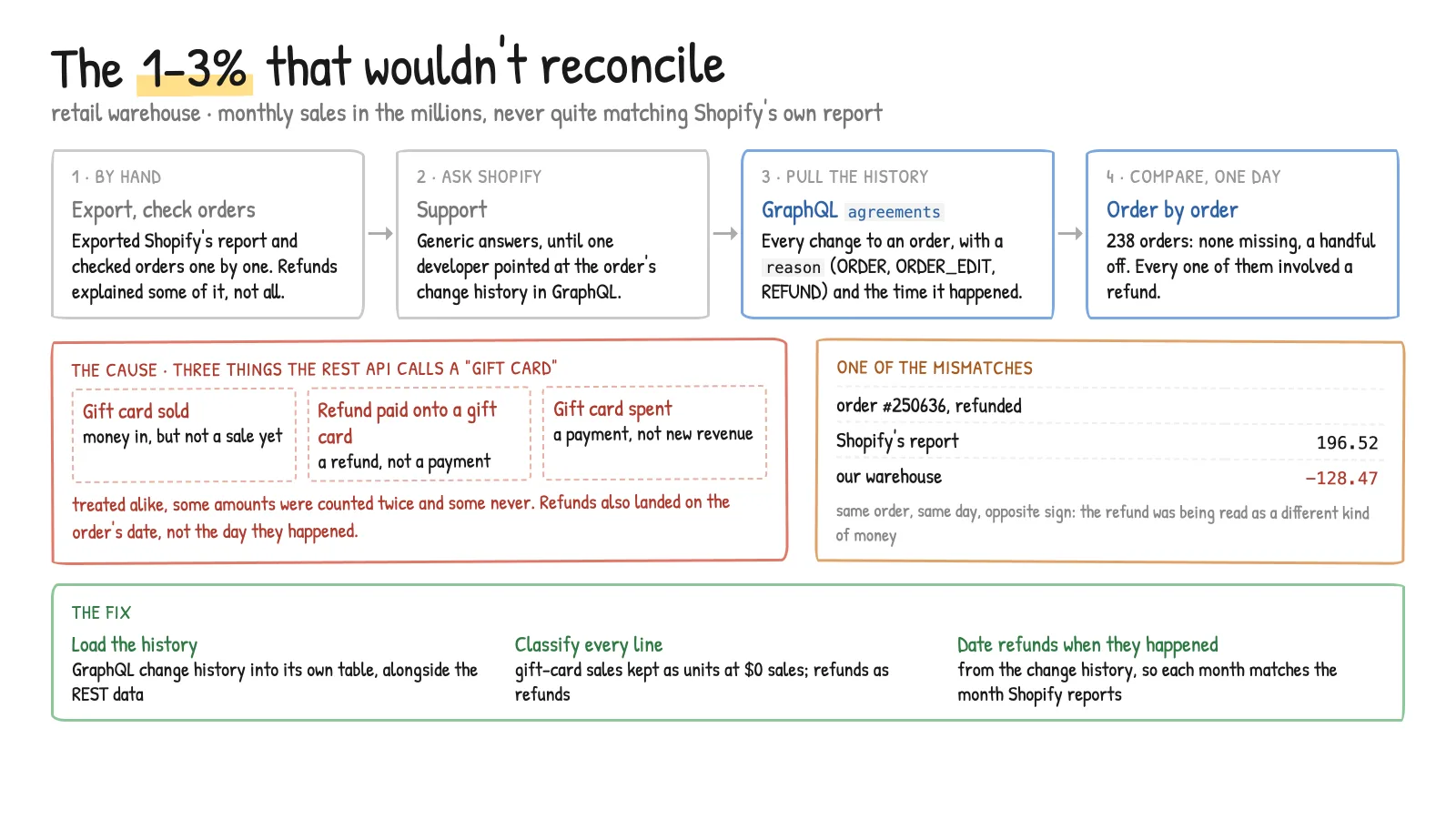
That was the exact problem at a US children's clothing brand with 10+ shops and an online store. Its monthly sales were in the millions, so 1–3% was real money, and finance could not trust either number. It took four months to find the cause: gift cards given as refunds and then spent were being counted twice. This post explains why that happens and how to fix it.
Why don't Shopify sales match the data warehouse?
Start with the usual causes. They explain most of the gap, and you need them out of the way before you can see the gift card problem.
- Gift card sales. Shopify says that when you sell a gift card, "it isn't included in any sales reports". Selling a gift card creates a debt you owe the customer, not a sale. When the card is spent, "the full item value is counted as a sale" (Shopify Help Center).
- Test orders. Shopify's reports leave them out. The API marks them with
test: true, so filter them out too. - Returns are dated by the return, not the order. Shopify says returns "display as a negative number on the date the return was processed" (sales reports). A March order refunded in April lowers April's sales.
- Time zones. The API gives times in UTC. Our daily totals only lined up with Shopify's after we moved them to the store's local time. Without that, late-evening orders land on the next day.
- Net sales excludes shipping and tax. Shopify defines net sales as "gross sales - discounts - sales reversals".
At this brand, taking out gift card sales and test orders closed most of the gap. A 1–3% difference was still there.
Tip: Compare one day at a time, not one month. Find the days with the biggest difference and look at those orders first.
How gift card refunds get counted twice
The brand sold gift cards. It also gave gift cards as refunds: a customer returns an item and gets the money back on a gift card instead of their bank card. Later the customer spends that card on something new.
Here is one gift card's life, with made-up amounts:
| Step | What Shopify's report does | What the REST-based warehouse did |
|---|---|---|
| Customer buys a $60 item | +$60 sales | +$60 sales |
| Customer returns it and gets a $60 gift card | −$60 returns | Not always seen as a return, so sales stay at +$60 |
| Customer spends the $60 card on a new item | +$60 sales | +$60 sales |
| Total | $60 | $120 in the worst case |
The REST data we were reading did not reliably tell three cases apart:
- a gift card bought as a product,
- a refund paid out onto a gift card,
- a gift card used to pay for an order.
So depending on the order, the warehouse either counted the money twice or missed it. Spread over thousands of orders a month, that was the 1–3%.
Why the Shopify REST API couldn't explain the gap
The pipeline was built on Shopify's REST Admin API: orders, line items, refunds and transactions. We checked the gap order by order against exports from the Shopify dashboard. Some orders had returns, but the returns did not explain the difference. No pattern showed up.
We asked Shopify support and sent them example orders. The first answers were general. Then a Shopify developer suggested we look at the order change history. We could not find that in the REST API. It is in the GraphQL Admin API, under each order's agreements.
Shopify describes a sales agreement as "a contract between a merchant and a customer to do business. Shopify creates a sales agreement whenever an order is placed, edited, or refunded" (SalesAgreement docs). Each agreement has:
happenedAt: when it happened,reason:ORDER,ORDER_EDIT,REFUND,RETURNorUNKNOWN,sales: one line per thing that changed. Each line has anactionType(ORDER,RETURN,UPDATE) and alineType(PRODUCT,GIFT_CARD,SHIPPING,ADJUSTMENTand a few more).
The lineType field is the one that matters. A gift card line says GIFT_CARD, so a gift card is never mistaken for a product sale.
Note: Shopify has called the REST Admin API "legacy" since 1 October 2024. Since 1 April 2025, new public apps must use GraphQL only (Shopify changelog). New Shopify features arrive in GraphQL first, so a new pipeline should start there.
How to get Shopify sales agreements with GraphQL
This is the shape of the query we used, cut down. It pages through orders updated since the last load and returns every agreement and every sale line:
query OrdersWithAgreements($query: String!, $cursor: String) {
  orders(first: 50, query: $query, after: $cursor) {
    pageInfo { hasNextPage endCursor }
    edges {
      node {
        id
        name
        test
        agreements(first: 10) {
          nodes {
            happenedAt
            reason
            sales(first: 50) {
              nodes {
                id
                actionType
                lineType
                quantity
                totalAmount    { shopMoney { amount } }
                totalTaxAmount { shopMoney { amount } }
                totalDiscountAmountBeforeTaxes { shopMoney { amount } }
                ... on ProductSale  { lineItem { id } }
                ... on GiftCardSale { lineItem { id } }
              }
            }
          }
        }
      }
    }
  }
}
Pass query as updated_at:>'2025-09-01T00:00:00Z' (with your last load time in place of the date) and loop until hasNextPage is false. In production this ran in Azure Data Factory. Each page was saved to blob storage as JSON, then flattened into a table with one row per sale line, keyed on the sale id. Because the key is the sale's own ID, loading the same order again updates its rows and doesn't duplicate them.
Warning: An order with many edits and refunds can have more agreements or sale lines than one page returns. Check
pageInfoon the nested lists too, or you will lose lines without any error.
How to calculate net sales that match Shopify
With one row per sale line, net sales becomes a simple query. totalAmount is "the total sale amount after taxes and discounts" (Sale docs), so subtract tax to get Shopify's net sales. Returns are stored as negative amounts, so a plain SUM subtracts them.
-- One row per sale line from orders.agreements.sales
-- happened_at_local = happenedAt converted to the store's time zone
SELECT
    CAST(s.happened_at_local AS date) AS sales_date,
    SUM(CASE WHEN s.line_type IN ('PRODUCT', 'ADJUSTMENT')
             THEN s.total_amount - s.total_tax_amount END) AS net_sales,
    SUM(CASE WHEN s.line_type = 'PRODUCT' AND s.action_type = 'RETURN'
             THEN s.total_amount - s.total_tax_amount END) AS returns,
    SUM(CASE WHEN s.line_type = 'GIFT_CARD' AND s.action_type = 'ORDER'
             THEN s.total_amount END) AS gift_cards_sold   -- a debt, not sales
FROM order_sale_lines s
JOIN orders o ON o.order_id = s.order_id
WHERE o.is_test = 0
GROUP BY CAST(s.happened_at_local AS date);
The rules, in plain words:
- Product lines are sales. Positive when sold, negative when returned, changed when an edit moves the price.
- Gift card lines are not sales. In the warehouse we kept them as their own rows with a sales value of zero. That way the card's issue date is still recorded, but its value is only counted once, when someone spends it.
- Adjustment lines are order-level changes that aren't tied to one product line. Keep them in net sales.
- Shipping lines stay out of net sales, as in Shopify's definition.
- Date every line by
happenedAt, not by the order's created date. That puts a refund in the month it happened, the same way Shopify does.
Tip: Convert
happenedAtwith a real time-zone conversion (AT TIME ZONEin SQL Server). Don't hard-code an offset. US Eastern time is 4 hours behind UTC in summer and 5 in winter. A fixed offset puts orders on the wrong day for half the year.
We rebuilt the brand's returns on the agreements data. That source had a row for every return. The line-item tables the old logic used were a little over 99% complete.
How to check your warehouse against Shopify, order by order
Don't trust the fix until you have checked it. We used three checks:
- Daily totals. Shopify's sales report for one day next to the warehouse total for the same day. Look at the days that differ most.
- Order by order. For one month, compare gross sales, discounts, returns and net items sold for each order between a Shopify export and the warehouse. Save each run, so you can see whether a change helped.
- Returns on their own. Returns are where gift card refunds hide. While we moved returns onto agreements data, the number of orders whose returns didn't match fell from about 540 to about 20, out of roughly 8,400 orders checked.
Once gift card lines were classified this way, the monthly totals matched Shopify's reports.
Need your Shopify numbers to match?
This was one part of a larger data engineering project: one Azure SQL warehouse for Shopify and the ApparelMagic warehouse system, daily loads, and Power BI reports for the finance, online and wholesale teams. The full story is in the case study, Retail numbers that finally match.
If your Shopify reports and your warehouse disagree and nobody can say why, get in touch. Send me one day where the numbers differ, and I'll tell you where I would look first.